> ## Documentation Index
> Fetch the complete documentation index at: https://docs.shuttle.dev/llms.txt
> Use this file to discover all available pages before exploring further.
# Introduction to Shuttle
> Shuttle is a Rust-native cloud development platform that lets you deploy your app while also taking care of all of your infrastructure.
Installation and quickstart guide
Check out some Shuttle examples
Get started from one of many templates
Follow one of our tutorials
## What is Shuttle?
As a platform designed with a focus on providing an exceptional developer experience, our goal is to make building and deploying applications a breeze. Shuttle's **Infrastructure from Code** capabilities make provisioning resources simple and hassle-free. Getting a database is just a matter of asking for one with a macro:
```rust theme={null}
#[shuttle_runtime::main]
async fn main(
// Automatically provisions a Postgres database
// and hands you an authenticated connection pool
#[shuttle_shared_db::Postgres] pool: sqlx::PgPool,
) -> ShuttleAxum {
// Application code
}
```
You can hit the ground running and swiftly transform your ideas into tangible solutions. Accelerate your project's progress by rapidly building and deploying prototypes, ensuring you bring your vision to life in record time.
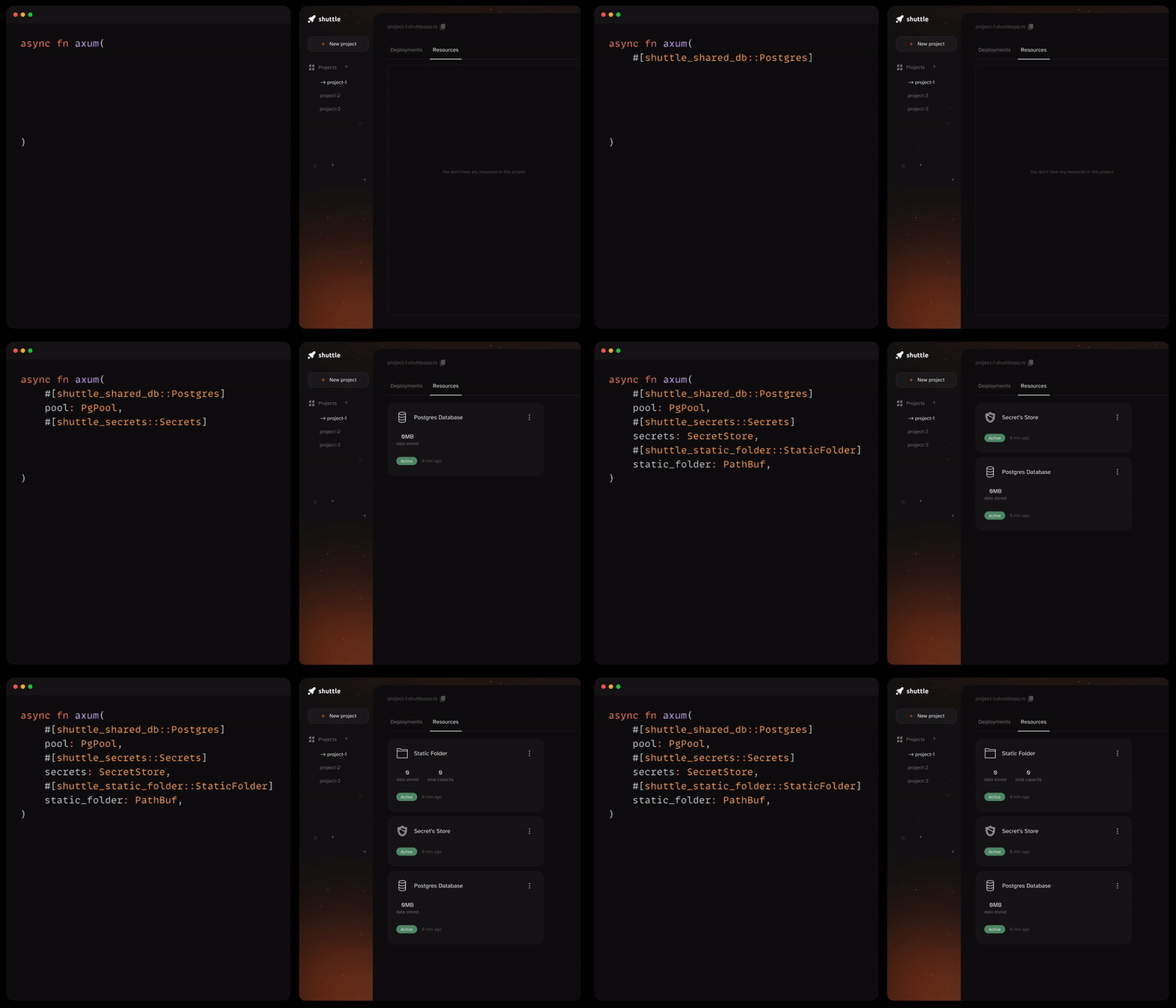 The GIF above demonstrates how easy it is to add resources to your project, visualized with the [Shuttle Console](https://console.shuttle.dev/).
Our mission is aligned with the wider shift of Rust becoming the future of web development, as we strive to deliver cutting-edge solutions that leverage the full potential of [the most loved programming language](https://survey.stackoverflow.co/2024/technology/#admired-and-desired).
## How Shuttle Works
The simplest way to build and deploy a web app on Shuttle looks like this:
```rust src/main.rs theme={null}
use axum::{routing::get, Router};
async fn hello_world() -> &'static str {
"Hello, world!"
}
#[shuttle_runtime::main]
async fn main() -> shuttle_axum::ShuttleAxum {
let router = Router::new().route("/", get(hello_world));
Ok(router.into())
}
```
This example starts an HTTP server where the `GET /` endpoint returns `Hello, world!`.
But most importantly, the code you see in the snippet above, is all it takes for `shuttle deploy` to deploy it.
This is possible due to the `#[shuttle_runtime::main]` procedural macro.
The macro wraps your app with Shuttle's runtime, which handles resource provisioning and initialization for you.
## Supported Frameworks
Many types of Rust programs can be deployed on Shuttle.
Shuttle provides all hosted apps with proxied HTTPS web traffic.
Therefore, the most common use case is to deploy web apps and APIs.
Any app that can bind to a socket and accept incoming HTTP traffic can run on Shuttle.
To make life easier we have implemented all the boilerplate required for these Rust web frameworks. Get started with just a few lines of code.
* [Axum](/examples/axum)
* [Actix Web](/examples/actix)
* [Rocket](/examples/rocket)
* [Rama](/examples/other)
* [Warp](/examples/other)
* [Tower](/examples/other)
* [Salvo](/examples/other)
* [Poem](/examples/other)
The Discord Bot building frameworks [Serenity](/examples/serenity) and [Poise](/examples/poise) are also officially supported.
If you need a custom service, you can take a look at our guide [right here](/templates/tutorials/custom-service).
## Resource Provisioning
The GIF above demonstrates how easy it is to add resources to your project, visualized with the [Shuttle Console](https://console.shuttle.dev/).
Our mission is aligned with the wider shift of Rust becoming the future of web development, as we strive to deliver cutting-edge solutions that leverage the full potential of [the most loved programming language](https://survey.stackoverflow.co/2024/technology/#admired-and-desired).
## How Shuttle Works
The simplest way to build and deploy a web app on Shuttle looks like this:
```rust src/main.rs theme={null}
use axum::{routing::get, Router};
async fn hello_world() -> &'static str {
"Hello, world!"
}
#[shuttle_runtime::main]
async fn main() -> shuttle_axum::ShuttleAxum {
let router = Router::new().route("/", get(hello_world));
Ok(router.into())
}
```
This example starts an HTTP server where the `GET /` endpoint returns `Hello, world!`.
But most importantly, the code you see in the snippet above, is all it takes for `shuttle deploy` to deploy it.
This is possible due to the `#[shuttle_runtime::main]` procedural macro.
The macro wraps your app with Shuttle's runtime, which handles resource provisioning and initialization for you.
## Supported Frameworks
Many types of Rust programs can be deployed on Shuttle.
Shuttle provides all hosted apps with proxied HTTPS web traffic.
Therefore, the most common use case is to deploy web apps and APIs.
Any app that can bind to a socket and accept incoming HTTP traffic can run on Shuttle.
To make life easier we have implemented all the boilerplate required for these Rust web frameworks. Get started with just a few lines of code.
* [Axum](/examples/axum)
* [Actix Web](/examples/actix)
* [Rocket](/examples/rocket)
* [Rama](/examples/other)
* [Warp](/examples/other)
* [Tower](/examples/other)
* [Salvo](/examples/other)
* [Poem](/examples/other)
The Discord Bot building frameworks [Serenity](/examples/serenity) and [Poise](/examples/poise) are also officially supported.
If you need a custom service, you can take a look at our guide [right here](/templates/tutorials/custom-service).
## Resource Provisioning
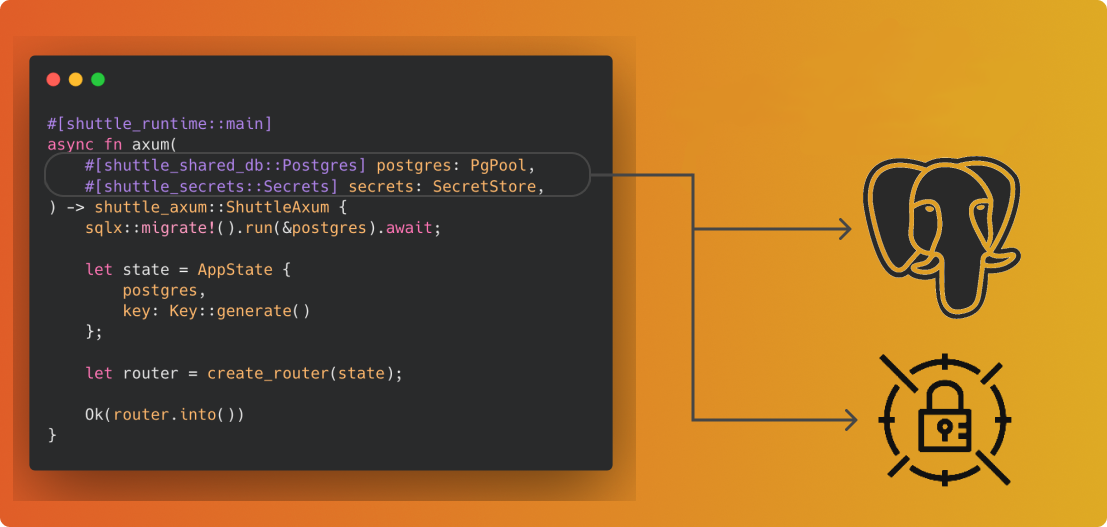 One of the great features of Shuttle is the provisioning of resources through macros.
With just a few lines of code, you can get access to various resources. Here are some examples:
### Secrets
```rust theme={null}
use shuttle_runtime::SecretStore;
#[shuttle_runtime::main]
async fn main(
#[shuttle_runtime::Secrets] secrets: SecretStore,
) -> shuttle_axum::ShuttleAxum {
// Get secret defined in `Secrets.toml` file.
let secret = secrets.get("MY_API_KEY").expect("secret was not found");
}
```
### Postgres Database
```rust theme={null}
#[shuttle_runtime::main]
async fn main(
#[shuttle_shared_db::Postgres] pool: PgPool,
) -> shuttle_axum::ShuttleAxum {
// Use the connection pool to query the Postgres database
pool.execute(include_str!("../schema.sql"))
.await
.map_err(CustomError::new)?;
}
```
For more info on resources, head on over to our [Resources](/resources/resources) section.
## Deployment Process
When you run `shuttle deploy`, your project code is archived and sent to our platform where it is built into a Docker image.
Your service will then be started on Shuttle's infrastructure on AWS in London (eu-west-2).
The generated code from `shuttle_runtime::main` handles resource provisioning and initialization, leaving you to focus on what matters.
## Get Involved
Check us out at shuttle-hq/shuttle
Click to accept invite
Go to @shuttle\_dev on Twitter
If you are wondering about the best way to get involved, here's how
One of the great features of Shuttle is the provisioning of resources through macros.
With just a few lines of code, you can get access to various resources. Here are some examples:
### Secrets
```rust theme={null}
use shuttle_runtime::SecretStore;
#[shuttle_runtime::main]
async fn main(
#[shuttle_runtime::Secrets] secrets: SecretStore,
) -> shuttle_axum::ShuttleAxum {
// Get secret defined in `Secrets.toml` file.
let secret = secrets.get("MY_API_KEY").expect("secret was not found");
}
```
### Postgres Database
```rust theme={null}
#[shuttle_runtime::main]
async fn main(
#[shuttle_shared_db::Postgres] pool: PgPool,
) -> shuttle_axum::ShuttleAxum {
// Use the connection pool to query the Postgres database
pool.execute(include_str!("../schema.sql"))
.await
.map_err(CustomError::new)?;
}
```
For more info on resources, head on over to our [Resources](/resources/resources) section.
## Deployment Process
When you run `shuttle deploy`, your project code is archived and sent to our platform where it is built into a Docker image.
Your service will then be started on Shuttle's infrastructure on AWS in London (eu-west-2).
The generated code from `shuttle_runtime::main` handles resource provisioning and initialization, leaving you to focus on what matters.
## Get Involved
Check us out at shuttle-hq/shuttle
Click to accept invite
Go to @shuttle\_dev on Twitter
If you are wondering about the best way to get involved, here's how